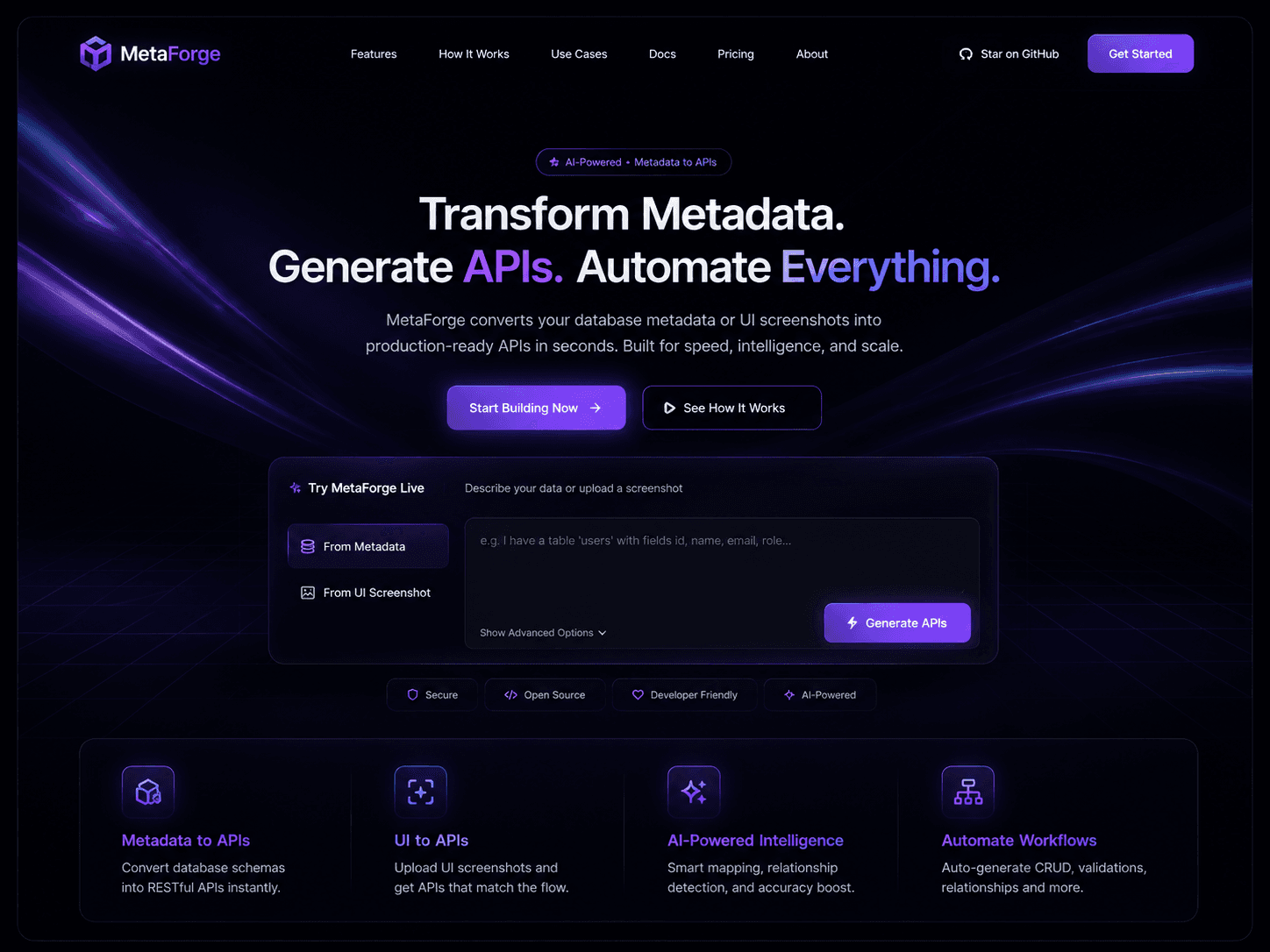
MetaForge - Metadata-Driven API Runtime
AI-powered platform that connects to OpenMetadata and your database to generate live, intelligent FastAPI endpoints — with lineage-aware impact analysis, data product readiness auditing, and UI screenshot-to-API generation
Timeline
8 weeks
Role
Full Stack Developer
Team
Solo Project
Status
In-progressTechnology Stack
Key Challenges
- Dynamically mounting and hot-reloading FastAPI routes in memory without server restarts
- Orchestrating 3 specialized LangGraph agents that share state and call MCP tools in sequence
- Implementing full OAuth 2.0 flow between MetaForge and a locally-running OpenMetadata instance
- Parsing UI screenshots with Claude Vision to infer the exact API shape a screen requires
- Combining metadata intelligence from MCP with live SQL execution into a single coherent API response
Key Learnings
- OpenMetadata MCP server tool surface and OAuth 2.0 integration patterns
- LangGraph stateful multi-agent orchestration with tool calling and checkpointing
- FastAPI dynamic route registration and Pydantic v2 model generation from runtime schema
- Claude Vision for structured UI analysis and API inference
- SQLAlchemy multi-database connection pooling across SQL Server, PostgreSQL, and MySQL
MetaForge
Turn your data catalog into live, intelligent APIs — instantly.


Overview
MetaForge connects to your OpenMetadata instance and your database, reads your schema, lineage, governance, and quality signals through the OpenMetadata MCP server, and generates live FastAPI endpoints backed by real data — in seconds, not days.
Connect once. Click a table. Your API is running at localhost:8000/orders with real rows, typed Pydantic models, and auto-generated Swagger docs — before you write a single line of code.
The Problem
Frontend developers are blocked waiting for backend engineers to expose APIs. Backend engineers write the same boilerplate CRUD code for every table — GET, POST, PUT, DELETE, validation, docs — over and over again.
Meanwhile, all the information needed to build that API already exists inside OpenMetadata: the table schema, who owns it, what the data quality looks like, how it connects to other tables downstream. Nobody was using that intelligence to generate working APIs.
MetaForge closes that gap.
What MetaForge Does
Connect your OpenMetadata instance (OAuth 2.0)
Connect your database (SQL Server · PostgreSQL · MySQL)
        ↓
Select any table in the dashboard
        ↓
3 AI agents read schema, lineage, governance, quality via MCP
        ↓
Live FastAPI endpoints mount in memory — no files written
        ↓
GET /orders → real rows from your real database
POST /orders → validated against your real schema
GET /docs → Swagger UI, always up to date
No code generation. No downloads. A running API you can hit right now.
Key Features
Demo 1 — Metadata-to-API Accelerator
Select any table in the explorer. MetaForge reads its schema, ownership, tags, and quality signals from OpenMetadata via MCP, generates typed Pydantic models from every column, and hot-mounts complete CRUD endpoints on the FastAPI runtime — connected directly to your database. Every generated endpoint carries OpenMetadata intelligence: owner info, PII warnings, quality score, and lineage context visible in Swagger docs.
- Full CRUD per table:
GET,GET /:id,POST,PUT /:id,DELETE /:id - Schema-driven Pydantic validation on every write endpoint
- PII fields flagged automatically based on OpenMetadata tags
- Swagger docs at
/docs— auto-updates on every change - Real data from your real database via direct SQLAlchemy connection
Demo 2 — Lineage-Aware Change Impact Copilot
Type a proposed schema change in plain English. MetaForge traverses the full OpenMetadata lineage graph upstream and downstream, identifies every table, dashboard, pipeline, and API endpoint that depends on what you are changing, pulls the owner of each affected asset, and produces a complete impact report — before you touch anything.
"I want to rename user_id to userId in the orders table"
        ↓
MetaForge calls get_entity_lineage("orders")
        ↓
Downstream: order_items · payments · shipments · revenue_dashboard
Owners to notify: data-eng@company.com · analytics@company.com
Severity: HIGH — 4 downstream assets affected
- Full upstream and downstream traversal via OpenMetadata MCP
- Owner contact info pulled from governance metadata
- Severity scoring per downstream asset
- Visual lineage map in the dashboard with affected nodes highlighted
Demo 3 — Data Product Readiness Auditor
Click Audit on any table. The evaluator agent calls four MCP tools simultaneously, scores the table across five dimensions, and produces an actionable remediation task list — telling your team exactly what to fix before calling data production-ready.
| Dimension | What it checks | |---|---| | Documentation | Description exists, columns annotated, glossary linked | | Ownership | Owner and team assigned in OpenMetadata | | Tags | Sensitivity labels correct, PII fields tagged | | Quality | Test suite passing, no anomalies, freshness acceptable | | Lineage | Upstream sources documented, downstream consumers known |
Bonus: the evaluator agent writes remediation tasks directly back to OpenMetadata as glossary terms, so fixes are tracked inside your data catalog — not in a separate tool.
Design-to-API — Upload a UI Screenshot
Drop any UI screenshot into the chat panel — a Figma export, a browser screenshot, a mockup. MetaForge uses Claude Vision to identify every data element visible: tables, cards, charts, forms, search bars. It asks targeted clarifying questions in the chat, then generates exactly the endpoints that screen needs — mapped to your real OpenMetadata tables and columns.
Upload: dashboard screenshot
        ↓
MetaForge detects: stats row · revenue chart · orders table · products list
MetaForge asks: "Is the orders table paginated? What time range for the chart?"
Developer answers in chat
        ↓
GET /analytics/stats
GET /analytics/revenue?range=30d
GET /orders?page=1&limit=20&status=
GET /products/top?limit=5
All live. All real data. Swagger updated.
Chat-Driven API Modification
The sidebar chat panel lets you modify any live endpoint in plain English. MetaForge sends your instruction and the current route config to Claude, patches the route function in memory, remounts it on FastAPI, and reloads the Swagger docs — no restart, no file edits.
"add pagination to orders"          → GET /orders?page=1&limit=20
"filter users by email"             → GET /users?email=
"add a count endpoint"              → GET /orders/count → { count: N }
"make POST /orders require status"  → 400 if status missing
Tech Stack
Frontend
- Next.js 14 — App Router, server components, streaming-compatible
- TypeScript — strict mode, full type coverage across all components
- Tailwind CSS — utility-first styling
- shadcn/ui — accessible, unstyled component primitives
- NextAuth.js — user authentication with session management
Backend
- FastAPI — async Python API framework with automatic OpenAPI generation
- Pydantic v2 — runtime schema validation, generated from OpenMetadata column types
- SQLAlchemy — multi-database connection pooling (SQL Server, PostgreSQL, MySQL)
- Python 3.11+ — async/await throughout, typed with mypy
AI + Agents
- LangGraph — stateful multi-agent orchestration with checkpointing
- Claude Sonnet — powers all three agents via Anthropic SDK
- Claude Vision — reads UI screenshots for Design-to-API feature
- OpenMetadata MCP — 5 tools:
search_metadata,get_entity_details,get_entity_lineage,create_glossary,create_glossary_term
Infrastructure
- Docker Compose — single command boots OpenMetadata + MySQL + Elasticsearch + all project services
- PostgreSQL — stores MetaForge user data, workspaces, and encrypted connection tokens
- Alembic — database migrations
- OAuth 2.0 — full authorization code flow between MetaForge and OpenMetadata
Architecture
Your Database (SQL Server / PostgreSQL / MySQL)
        ↓ SQL Server connector
OpenMetadata (Docker · localhost:8585)
  MySQL · Elasticsearch · MCP Server
        ↓ OAuth 2.0 + MCP tools
FastAPI Backend (localhost:8000)
  ├── OAuth endpoints (start · callback · health)
  ├── LangGraph orchestrator
  │     ├── Schema agent   → search_metadata + get_entity_details + get_entity_lineage
  │     ├── API agent      → get_entity_details → FastAPI route generation
  │     └── Evaluator agent → get_entity_details + create_glossary_term
  └── FastAPI dynamic router (live generated endpoints · SQLAlchemy executor)
        ↓
Next.js Dashboard (localhost:3000)
  ├── Auth (NextAuth.js)
  ├── Connect OpenMetadata (OAuth flow)
  ├── Metadata Explorer (tables · lineage · governance)
  ├── Agent Workspace (chat + image upload)
  ├── API Playground (test generated endpoints)
  └── Readiness Audit (score cards + remediation tasks)
Project Structure
metaforge/
├── apps/
│   ├── web/                          # Next.js 14 dashboard
│   │   ├── app/
│   │   │   ├── (auth)/               # Login + signup pages
│   │   │   ├── (dashboard)/          # Main app shell
│   │   │   │   ├── workspace/        # Workspace management
│   │   │   │   ├── explorer/         # Metadata explorer
│   │   │   │   ├── apis/             # Generated API viewer
│   │   │   │   ├── chat/             # Agent workspace + image upload
│   │   │   │   └── settings/         # Connections + team
│   │   │   └── api/                  # Next.js API routes
│   │   ├── components/
│   │   │   ├── ui/                   # shadcn components
│   │   │   ├── explorer/             # Table browser, schema viewer, lineage map
│   │   │   ├── agents/               # Chat panel, streaming responses
│   │   │   └── shared/               # Status indicators, connection forms
│   │   └── lib/
│   │       ├── auth.ts               # NextAuth configuration
│   │       └── api.ts                # Typed API client
│   │
│   ├── api/                          # FastAPI backend
│   │   ├── main.py                   # App entry point
│   │   ├── core/
│   │   │   ├── config.py             # Settings + environment
│   │   │   ├── security.py           # Token encryption (Fernet)
│   │   │   └── database.py           # PostgreSQL connection
│   │   ├── models/                   # SQLAlchemy ORM models
│   │   │   ├── user.py
│   │   │   ├── workspace.py
│   │   │   └── api_version.py
│   │   ├── routers/
│   │   │   ├── integrations/
│   │   │   │   ├── openmetadata/     # OAuth start · callback · health
│   │   │   │   └── database/         # DB connect · health · tables
│   │   │   ├── agents.py             # Run agents, stream responses
│   │   │   └── generated.py          # Live generated API endpoints
│   │   └── services/
│   │       ├── mcp_client.py         # MCP tool calls via OAuth token
│   │       ├── db_executor.py        # SQLAlchemy query execution
│   │       └── api_exporter.py       # Export as FastAPI ZIP project
│   │
│   └── agents/                       # LangGraph agents
│       ├── graph/
│       │   └── main_graph.py         # Orchestrator — routes intent to agents
│       ├── agents/
│       │   ├── schema_agent.py       # Reads schema + lineage via MCP
│       │   ├── api_agent.py          # Generates FastAPI routes + Pydantic models
│       │   └── evaluator_agent.py    # Scores readiness + writes glossary terms
│       ├── tools/
│       │   ├── mcp_tools.py          # Wrapper for all 5 MCP tools
│       │   └── vision_tool.py        # Claude Vision for screenshot analysis
│       └── state/
│           └── store.py              # LangGraph state + checkpointing
│
├── packages/
│   └── shared/                       # Shared TypeScript + Python types
│
├── infra/
│   ├── docker/
│   │   └── docker-compose.yml        # Full stack in one command
│   └── postgres/
│       └── migrations/               # Alembic migration files
│
├── docs/                             # Documentation site (Mintlify)
│   ├── introduction.mdx
│   ├── quickstart.mdx
│   ├── architecture.mdx
│   └── api-reference/
│
└── .github/
    └── workflows/
        ├── ci.yml                    # Tests on every PR
        └── deploy.yml                # Deploy on merge to main
Getting Started
Prerequisites
- Docker Desktop installed and running
- Node.js 18+ and Python 3.11+
- SQL Server, PostgreSQL, or MySQL instance with your data
- Anthropic API key (for Claude Sonnet + Vision)
1. Clone and install
git clone https://github.com/Tusharkanta407/Metaforge
cd metaforge

# Install frontend dependencies
cd apps/web && npm install

# Install backend dependencies
cd ../api && pip install -r requirements.txt

# Install agent dependencies
cd ../agents && pip install -r requirements.txt
2. Configure environment
# Copy example env files
cp .env.example .env

# Fill in your values
OM_SERVER_URL=http://localhost:8585
OM_OAUTH_CLIENT_ID=metaforge-client
OM_OAUTH_CLIENT_SECRET=your_secret_from_om_settings
OM_OAUTH_REDIRECT_URI=http://localhost:8000/api/integrations/openmetadata/oauth/callback
TOKEN_ENCRYPTION_KEY=your_fernet_key
ANTHROPIC_API_KEY=sk-ant-your_key
DATABASE_URL=postgresql://user:pass@localhost:5432/metaforge
3. Start OpenMetadata
cd infra/docker
docker compose up -d

# Wait ~2 minutes then open
open http://localhost:8585
4. Register MetaForge as OAuth client in OpenMetadata
OpenMetadata UI → Settings → Applications → Add Application
  Name:         MetaForge
  Client ID:    metaforge-client
  Redirect URI: http://localhost:8000/api/integrations/openmetadata/oauth/callback
5. Run MetaForge
# Terminal 1 — backend
cd apps/api && uvicorn main:app --reload --port 8000

# Terminal 2 — agents
cd apps/agents && python -m uvicorn server:app --port 8001

# Terminal 3 — frontend
cd apps/web && npm run dev
Open http://localhost:3000 — connect your OpenMetadata instance and your database, then select any table to generate your first live API.
What I Learned
Building MetaForge taught me:
- How to design a stateful multi-agent system where three specialized agents share context, call external tools via MCP, and hand off results without losing state between steps
- OpenMetadata's MCP server tool surface — how
get_entity_lineagetraverses dependency graphs and howcreate_glossary_termwrites structured data back into the catalog - FastAPI dynamic route registration: mounting, patching, and unmounting route handlers on a running application without restarting the process
- Claude Vision for structured analysis: prompting the model to return a JSON schema of UI elements from an arbitrary screenshot reliably enough to drive API generation
- Full OAuth 2.0 authorization code flow implementation: state parameter CSRF protection, token exchange, Fernet encryption at rest, and silent refresh on expiry
- The architectural difference between metadata intelligence (what MCP provides) and query execution (what SQLAlchemy provides) — and why combining both is what makes the generated APIs genuinely useful rather than just descriptive
Challenges
Dynamic route mounting without restart FastAPI does not natively support adding routes after the application starts. MetaForge solves this by maintaining a mutable route registry and re-registering the full router on every change — fast enough to appear instant from the UI.
Multi-agent state with MCP tool calls LangGraph agents run asynchronously and each needs to call MCP tools using the user's OAuth token. Passing the token through LangGraph's state store while keeping it encrypted required a careful separation between agent logic and credential management.
OAuth 2.0 with local OpenMetadata Running OpenMetadata locally in Docker with a self-signed or no TLS certificate creates redirect URI mismatches and CORS issues in the OAuth flow. Solved by configuring OpenMetadata's allowed origins and redirect URIs explicitly in its application settings before initiating the flow.
UI screenshot to API mapping Claude Vision returns a description of what it sees. Turning that description into a reliable JSON schema of API endpoints — with correct HTTP methods, path parameters, and query params — required iterative prompt engineering with structured output constraints and a fallback clarification loop when confidence was low.
Roadmap
- [ ] API versioning — roll back any generated endpoint to a previous state
- [ ] Export generated APIs as a downloadable FastAPI project (ZIP)
- [ ] Multi-table join detection — auto-generate
/users/:id/ordersfrom foreign keys - [ ] Streaming agent responses — watch agents reason in real time
- [ ] Team collaboration — invite members to a workspace, share generated APIs
- [ ] Rate limiting per endpoint — configurable from the dashboard
- [ ] Webhook support — trigger on data changes in any generated endpoint
- [ ] OpenAPI import — point at an existing spec, MetaForge mounts it live
Contributing
Pull requests are welcome. For major changes please open an issue first to discuss what you would like to change.
# Run backend tests
cd apps/api && pytest

# Run frontend tests
cd apps/web && npm run test

# Lint
cd apps/api && ruff check .
cd apps/web && npm run lint
License
MIT — see LICENSE for details.
Built as a personal project and originally submitted to the OpenMetadata Hackathon 2025 (WeMakeDevs).